
To construct and document a virtual machine simulator for an operating system.
Base platform: Java
System Enhancements: message passing, file access controls
Customer: Professor P. J. Denning
John Cavalieri
Dennis Pereira
Ely VanReen Soto (leader)
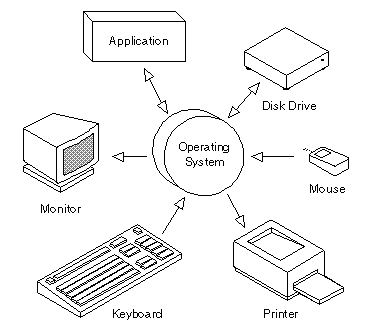
While some operating systems have been around since the early days of digital computing, most have appeared in the early 70's to the present time, varying from powerful multi-user OS's to little OS's that ran on 8 bit computers in under 64K of memory. As the years have gone by to the present day, operating systems have changed, maximizing user convenience and responsiveness. However, design decisions are still necessary when building a mainframe versus smaller systems. Overall, features that were at one time available on only mainframes have been adopted by microcomputers.
All computers must have an operating system that, in short, acts as the interface between the user, the software, and the hardware. Operating systems perform basic tasks, such as recognizing input from the keyboard, sending output to the display screen, keeping track of files and directories on the disk, and controlling peripheral devices such as mice and printers. For large systems, the operating system has even greater responsibilities and powers. It is like a traffic cop -- it makes sure that different programs and users running at the same time do not interfere with each other. The operating system is also responsible for security, ensuring that unauthorized users do not access the system.
Operating systems provide a software platform on top of which other programs, called application programs, can run. The application programs must be written to run on top of a particular operating system. Your choice of operating system, therefore, determines to a great extent the applications you can run. For PC's the most popular operating systems are DOS, OS/2, Linux and Windows.
As a user, you normally interact with the operating system through a set of command statements. For example, the DOS operating system contains commands such as COPY and RENAME for copying files and changing the names of files, respectively. The commands are accepted and executed by a part of the operating system called the command line interpreter (also known as the shell). Some operating systems include the command interpreter in the kernel. Other operating systems, such as MS-DOS and UNIX, treat the command interpreter as a special program that is running when a job is initiated, or when a user first logs on. The command statements themselves deal with process creation and management, I/O handling, secondary-storage management, main-memory management, file-system access, protection, and networking. There are two general ways in which these commands can be implemented. In one approach, the command interpreter itself contains the code to execute the command. For example, a command to make a directory may cause the command interpreter to jump to a section of its code that sets up the parameters and makes the appropriate system call. In this case, the number of commands that can be given determines the size of the command interpreter, since each command requires its own implementing code. The alternative approach used by UNIX and our operating system implements most commands by system programs. In this case, the command interpreter does not understand the command in any way; it merely uses the command to identify a file to be loaded into memory and executed. In this way, programmers can add new commands to the system easily by creating new files with the proper names. The command-interpreter program, which can be small, does not have to be changed for new commands to be added.
As we have seen, a computer system is made up of layers. The system programs are at a level higher than that of the other routines because the application programs may view everything under them in the hierarchy as though the latter were part of the machine itself. This layered approach is taken to its logical conclusion in IBM's concept of a virtual machine. By using CPU scheduling and virtual-memory techniques, an operating system can create the illusion that a process has its own processor with its own (virtual) memory. The virtual machine thus provides an interface that is identical to the underlying bare hardware. Users thus are given their own virtual machines so that they can run any of the operating systems or software packages that are available on the underlying machine.
The virtual-machine software can run in monitor mode, since it is the operating system. The virtual machine itself can execute in only user mode. Just as the physical machine has two modes so must the virtual machine. Consequently, there is a virtual user mode and a virtual monitor mode, both of which run in a physical user mode.
The virtual-machine concept has several advantages. There is complete protection of the various system resources. Each virtual machine is completely isolated from all other virtual machines, so there are no security problems. Such a virtual-machine system is also a perfect vehicle for operating-systems research and development because system programmers are given their own virtual machine and system development is done on the virtual machine instead of on a physical machine.
For most users, the file system is the most visible aspect of an operating system. It provides the mechanism for on-line storage of and access to both data and programs that belong to the operating system and to all the users of the computer system. The file system consists of two distinct pars: a collection of files and a directory structure. File protection is also necessary in an environment that allows multiple users to access files.
The purpose of this project was to produce a working simulator of the command execution function of an operating system. The purpose of this report is to demonstrate our knowledge in a visual form. This assignment introduced us to the structures at the upper layers of the operating system: the virtual machines manager, file and directory system, and the shell. It also included an enhancement which in our case was a message system (See System Specifications). The components of the project were delivered at the appropriate dates during semester and can be found in the project action report section of this documentation.
Overall, by completing the project we understand how an operating system goes about the execution of commands given by a user.