
Red flags are statements of concern, things that need to be taken care of if the project is to succeed. Most red flags are threats of various kinds. It is important both to state the flag and to declare an action to take care of it.
(1) The parser does not recognize optionflags with a "-" in
front. It recognizes anything.
The plan to fix
the red flag is to take
some more time to develop an argument recognition and have
some way to handle that.
(possibly in state 5 our empty state).
When a red flag is resolved, move it into this section at the next report, and drop it from this section at the report after that.
(1) We are having trouble configuring java in Win 98 but have it working on
Windows 2000.
The problem
is fixed. It was the path that was causing the problem.
(2) Having difficulty with floppy disk drive on lap top.
We
reformatted a floppy disk and the drive began to work again. No explanation, it
just did.
Each promise consists of a person responsible, the condition of satisfaction, and the due date. The table provides extra columns to state the actual completion date and when it was due.
| Responsibility | Assignment | Planned Date | Actual Date | Due Date |
| John | File System | 2/26/01 | 2/28/01 | |
| Ely | 'cat' function operational | 2/26/01 | 2/28/01 | |
| Dennis | Command interpreter operational | 3/12/01 | 3/14/01 | |
| TBD | Baseline simulator works (+ pipes, I/O redirection) | 3/26/01 | 3/28/01 | |
| TBD | Enhanced OS | 4/9/01 | 4/11/01 | |
| Team | Whole simulator works; draft report URL submitted | 4/9/01 | 4/11/01 | |
| John | Project URL delivered | 4/21/01 | 4/23/01 | |
| Team | Exihibition | 5/1/01 | 5/1/01 |
When a promise is completed it is moved to this section.
| Responsibility | Assignment | Planned Date | Actual Date | Due Date |
| Team | Form team | 1/17/01 | 1/17/01 | 1/17/01 |
| Team | Select team leader | 1/24/01 | 1/22/01 | |
| Ely | Create Console Window | 1/24/01 | 1/24/01 | 1/31/01 |
| Ely | Console window operational | 1/29/01 | 1/27/01 | 1/31/01 |
| John | System Specifications | 2/12/01 | 2/12/01 | 2/14/01 |
| Dennis | Prototype Parser Works | 2/12/01 | 2/13/01 | 2/14/01 |
The Parser:
The
parser has seven states. each state is a case that is satisfied by a
The
first state (state 0) recognizes a command identifier. if the first
The
second state (state 1) looks for input redirection, output redirection,
The
third state (state 2) looks for a filename for input redirection. If a
The
fourth state (state 3) gains control from state 6. This state is used
The
fifth state (state 4) looks for a filename for output redirection. If a
The
sixth state (state 5) is empty. In the future we will eliminate this
The
seventh state (state 6) looks for a command identifier after a pipe
-------
The
parser stores the information from the lineToParse in a class called
In
order to handle pipes and multiple commands another class called
As an example, the command "cat < testfile | sort" would produce a script of this form:
1 create virtual machine vm1
2
set vm1.IN = open file "testfile"
3
create pipe p1
4
set vm1.OUT = p1.IN
5
create virtual machine vm2 "sort"
6
set p1.OUT = vm2.IN
7
set vm2.OUT = creator's OUT
It works just like this does excluding the last line. It is moved into the output redirection. Also the output prints in the dos window, not in the console. We decided to keep it this way because these commands should not be seen in the emulator anyway. They are background actions that will be performed by the virtual machine. Below are two screen shots of what is happening when the VM is being run.
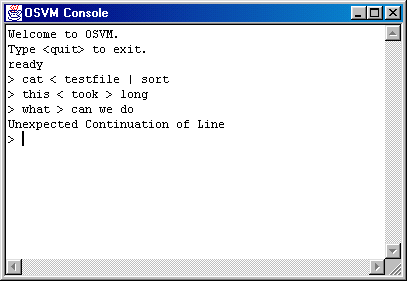
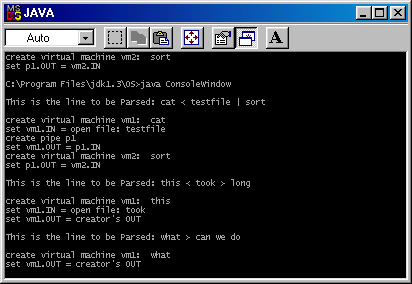
The first two commands work properly but the last command is purposely typed wrong and an error message is shown.
ConsoleWindow.java
KeyboardBuffer.java
Parser.java
Contents | PAR #1 | PAR #2 | PAR #3 | PAR #4 | PAR #5 | PAR #6