
Red flags are statements of concern, things that need to be taken care of if the project is to succeed. Most red flags are threats of various kinds. It is important both to state the flag and to declare an action to take care of it.
(1) There are no red flags at this time. The project is almost complete.
When a red flag is resolved, move it into this section at the next report, and drop it from this section at the report after that.
(1) Code for the ls command must be changed to represent changes made in the command interpreter.
(2) Output redirection does not save the output to the desired file.
Each promise consists of a person responsible, the condition of satisfaction, and the due date. The table provides extra columns to state the actual completion date and when it was due.
| Responsibility | Assignment | Planned Date | Actual Date | Due Date |
| John | Project URL delivered | 4/21/01 | 4/23/01 | |
| Team | Exihibition | 5/1/01 | 5/1/01 |
When a promise is completed it is moved to this section.
| Responsibility | Assignment | Planned Date | Actual Date | Due Date |
| Team | Form team | 1/17/01 | 1/17/01 | 1/17/01 |
| Team | Select team leader | 1/24/01 | 1/22/01 | |
| Ely | Create Console Window | 1/24/01 | 1/24/01 | 1/31/01 |
| Ely | Console window operational | 1/29/01 | 1/27/01 | 1/31/01 |
| John | System Specifications | 2/12/01 | 2/12/01 | 2/14/01 |
| Dennis | Prototype Parser Works | 2/12/01 | 2/13/01 | 2/14/01 |
| John & Ely | Testing and Understanding of Parser | 2/12/01 | 2/13/01 | 2/14/01 |
| John | File System(all but mv) | 2/26/01 | 2/27/01 | 2/28/01 |
| John | 'cat' function operational | 2/26/01 | 2/27/01 | 2/28/01 |
| Dennis & Ely | Testing and Understanding of File System | 2/26/01 | 2/28/01 | 2/28/01 |
| John | mv command | 3/12/01 | 3/18/01 | 2/28/01 |
| Team | Set up meeting with Professor Denning | 3/14/01 | 3/19/01 | 3/14/01 |
| Ely | Command interpreter operational | 3/12/01 | 3/12/01 | 3/14/01 |
| Dennis | Parser Revisions | 3/12/01 | 3/28/01 | 2/14/01 |
| Ely | Enhanced OS | 4/9/01 | 4/7/01 | 4/11/01 |
| John | draft report URL submitted | 4/9/01 | 4/10/01 | 4/11/01 |
| Ely | Baseline simulator works (+ pipes, I/O redirection) | 3/26/01 | 3/28/01 | 3/28/01 |
| Ely & Dennis | Whole simulator works; | 4/9/01 | 4/11/01 | 4/11/01 |
The full simulator (baseline + enhancements) works properly.
The URL of the draft of our report is also provided for feedback. It is http://mason.gmu.edu/~jcavalie and click on CS471 Project.
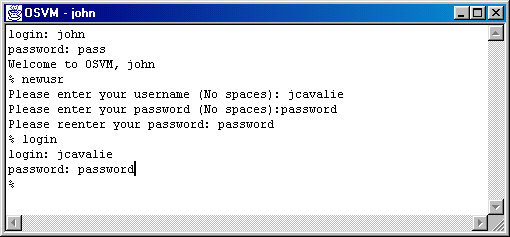
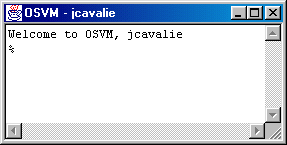
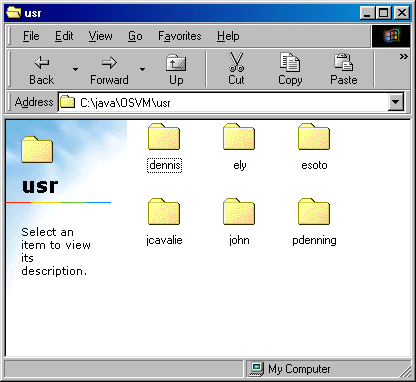
The following execution creates a new user called jcavalie. When the command "login" is given, a new window is created after the user authenticates himself with a login name and valid password. The window titled "jcavalie" is the new window created, while the original window remains logged in as "john". Notice that you can immediately login as them and that it creates a folder for them in the \usr directory.
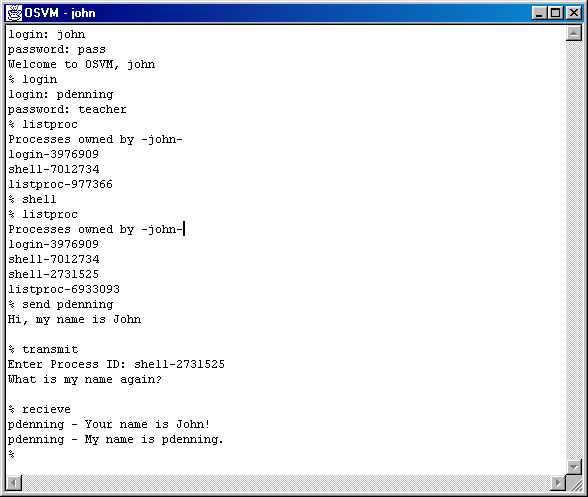
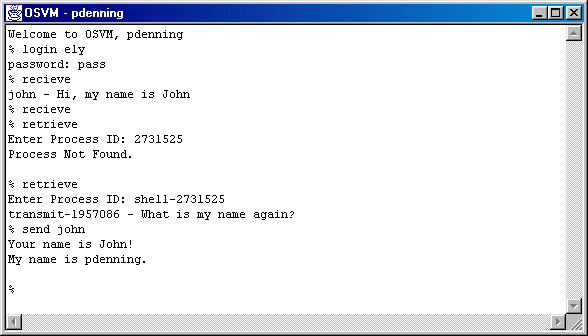
The following is a demonstration of the enhanced send receive system using pdenning as the user that receives..
Contents | PAR #1 | PAR #2 | PAR #3 | PAR #4 | PAR #5 | PAR #6