
The following diagram is a diagram of our system specifications. Below is a description of what each part does.
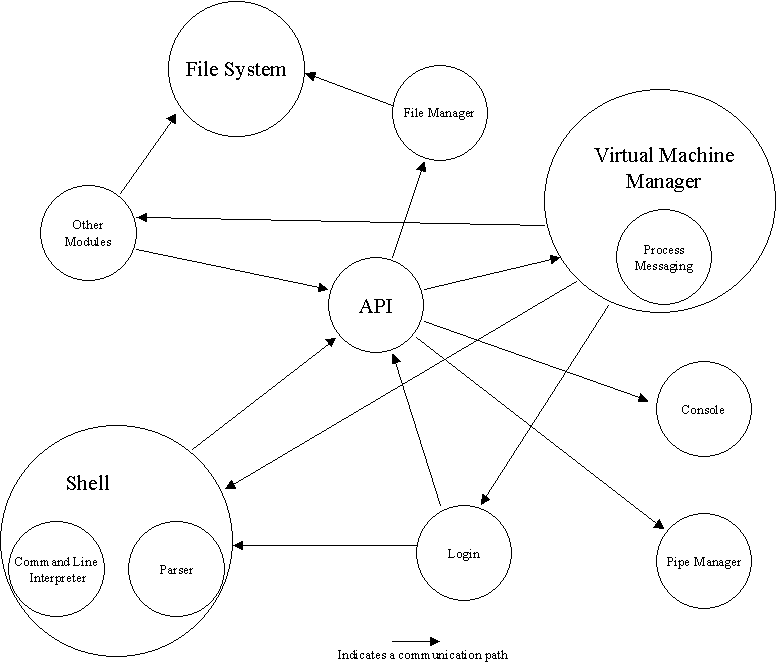
Shell
The shell is a program that receives a line of input typed on the keyboard, parses it into a sequence of tokens, connects programs and files together as specified by the sequence, and finally loads and executes the specified commands. The shell is a child VM to the initial login virtual machine or to the shell previously executing it.
Command Line Interpreter
The command line interpreter is the subset of the shell that receives and interprets commands so that the shell may execute them in the correct manner. Once a command is received, the command interpreter analyzes the syntax (see Parser) and executes the instructions in order to get the virtual machine(s) ready for execution.
Parser
The parser is a subset of the Command Line Interpreter, which analyzes a command string and returns a list of instructions that the command line interpreter must execute.
The parser looks for these patterns:
commandline ::= cmd [< infile][ | cmd ]* [ > outfile]
cmd ::= commandname [optionflags] [arguments]
optionflags ::= -optionletter [ -optionletter]*
arguments ::= argname [argname]*
The command line consists of an optional input file and optional output file connected by a pipeline of one or more commands separated by pipe symbols (|). If the infile (or outfile) is omitted, the pipeline input (or output) is the same as the shell's -- usually the keyboard (or display). The shell looks up the command names (and the file names) in the directory system to find the command programs (or the files). If the program or file is not there, the shell will tell the user "command not found". The commands are stored as programs in the file system (auto-loading). In this way, new commands can be added by placing their programs in a directory without recompiling the shell.
When the shell is ready for user input, it displays a prompt symbol (%) and waits for the user to type a command line.
Display and Keyboard
This operating system only provides for two "devices" -- the keyboard and the display. Both are part of the "console window". All input typed on the keyboard is displayed in the console window. All program output to the display device is displayed in the console window. A command WRITE( dh, string ) displays the string on the display (pointed to by the handle dh). A command line=READ( kh ) reads the next complete line typed by the user on the keyboard (pointed to by handle kh).
Virtual Machine Manager
The Virtual Machine Manager controls the creation, execution, and deletion of virtual machines in the Operating System. A virtual machine is a program, which has been wrapped by a class that provides it the necessary connections, so it will able to execute in the current environment.
Our current VMM model assigns an array consisting of each child handle executed to each VM. This model differs from the default model, which uses siblings linked in a chain to provide access to the entire VM tree. Our model proved more efficient in tracking the children VMs. Furthermore, the virtual machines need not be bothered by a process needing to track all the children of a specific VM.
The VMM uses the methods CreateVM(), DeleteVM(), Exit(), and Compute() to control the execution of the virtual machines. CreateVM() creates a virtual machines specified by the passed parameters and returns a handle. The Parent virtual machine can then call Compute() to begin the execution of all its children and pauses its own thread.
Each of these Virtual Machines then calls Exit() when they are finished executing. Exit() does some standard finalizing procedures, calls DeleteVM(), and decrements the parent VM’s undone counter. Once all the children have completed and called Exit(), the parent VM resumes its execution.
A subset operation of the VMM is to handle inter-thread communication, by controlling access to the message boxes of each virtual machine.
File System
The simulator includes an interface provided by java to the host-computers file system, which is interpreted by programs, named after standard Unix file system commands. Some conventions for the directory structure have been made such as a "/bin" directory to hold the executable OS binary files for commands, and a "/usr/username" directory to hold the sub-trees of each user of the virtual machine simulator.
Finally, a “/sys” directory holds other OS files such as a user and password file.
Pipes Manager
The pipes manager creates and deletes pipes and handles, specifically for reading and writing. Pipes act like producer-consumer buffers transmitting streams of bytes between virtual machines. The basic operations of the pipe manager are:
ph = CREATE_PIPE()
WRITE(ph,x)
x = READ(ph)
Where ph is a handle pointing to an initially empty pipe, WRITE inserts item x into the pipe (after waiting, if need be, until there is a slot in the pipe to accept the item), and READ returns the next item from the pipe (after waiting, if need be, until there is an item in the pipe). Note that virtual machines cannot directly access the Pipe Version of Read and Write. These two methods are called by the standard Read and Write if the handles are found to be pipes.
File Manager
The file manager creates files for input and output and controls their specific reading and writing. The basic operations of the file manager are:
fh = CREATE_FILE(filename)
WRITE(fh,x)
x = READ(fh)
Where fh is a handle pointing to the open file specified by filename. Note that virtual machines cannot directly access the File Version of Read and Write. These two methods are called by the standard Read and Write if the handles are found to be files.
Commands
System Commands are the executable programs stored in the "/bin" directory. They are loaded by the shell and executed. A command consists of a command name and zero or more arguments. Arguments are strings that set modes or provide specific input for the command.
The following list is a composition of all the available commands:
cat - outputs the contents of a text file
cd - changes directory (. and .. are accepted as well)
copy - it copies the first argument and calls it the second argument
date - outputs the current date and time
edit - this is a simple text editor. It receives 0 arguments or 1 argument
help - lists the available commands
listproc - lists the current processes and their identification number
login - logs in a new user
logout - logs out a user
ls - outputs the names of all files and directories in the specified directory
mkdir - creates a directory
mv - moves a file or directory to the given location
newusr - creates a new user and sets up a new password. Only users
already
logged into the system can execute
this command
receive - receives messages in the mailbox
rm - deletes the specified file or directory
rmdir - deletes the specified directory
send - sends a message to the specified user
shell - creates a new shell
sort - sorts a list alphabetically asscending (-a) or descending (-d)
transmit - transmits a process to whom ever chooses to retrieve it
Enhancement
The OS has been modified to be multi-user, allowing as many users to login at once. Furthermore, a virtual machine messaging system has been implemented using the commands transmit and retrieve. They allow different users to have virtual machines that exchange messages with each other. Finally, a user messaging system has been implemented. It uses send to write messages to the specified user mailbox, and receive to view the mailbox.