
Red flags are statements of concern, things that need to be taken care of if the project is to succeed. Most red flags are threats of various kinds. It is important both to state the flag and to declare an action to take care of it.
(1) mv command can only move file object down the file system structure. More time is required to fix this problem.
(2) Command interpreter is not done and is not required for this PAR.
When a red flag is resolved, move it into this section at the next report, and drop it from this section at the report after that.
(1) The parser does not recognize optionflags with a "-" in
front. It recognizes anything.
The plan to
fix the red flag is to take some more time to develop an argument recognition
and have some way to handle that.
(possibly in
state 5 our empty state).
Each promise consists of a person responsible, the condition of satisfaction, and the due date. The table provides extra columns to state the actual completion date and when it was due.
| Responsibility | Assignment | Planned Date | Actual Date | Due Date |
| Dennis | Parser Revisions | 3/12/01 | 2/14/01 | |
| John | mv command | 3/12/01 | 2/28/01 | |
| Team | Set up meeting with Professor Denning | 3/14/01 | 3/14/01 | |
| Dennis | Command interpreter operational | 3/12/01 | 3/14/01 | |
| TBD | Baseline simulator works (+ pipes, I/O redirection) | 3/26/01 | 3/28/01 | |
| TBD | Enhanced OS | 4/9/01 | 4/11/01 | |
| Team | Whole simulator works; draft report URL submitted | 4/9/01 | 4/11/01 | |
| John | Project URL delivered | 4/21/01 | 4/23/01 | |
| Team | Exihibition | 5/1/01 | 5/1/01 |
When a promise is completed it is moved to this section.
| Responsibility | Assignment | Planned Date | Actual Date | Due Date |
| Team | Form team | 1/17/01 | 1/17/01 | 1/17/01 |
| Team | Select team leader | 1/24/01 | 1/22/01 | |
| Ely | Create Console Window | 1/24/01 | 1/24/01 | 1/31/01 |
| Ely | Console window operational | 1/29/01 | 1/27/01 | 1/31/01 |
| John | System Specifications | 2/12/01 | 2/12/01 | 2/14/01 |
| Dennis | Prototype Parser Works | 2/12/01 | 2/13/01 | 2/14/01 |
| John & Ely | Testing and Understanding of Parser | 2/12/01 | 2/13/01 | 2/14/01 |
| John | File System(all but mv) | 2/26/01 | 2/27/01 | 2/28/01 |
| John | 'cat' function operational | 2/26/01 | 2/27/01 | 2/28/01 |
| Dennis & Ely | Testing and Understanding of File System | 2/26/01 | 2/28/01 | 2/28/01 |
The File System:
A file directory structure had to first be built to test on. The following is the directory structure:
Home
John
My_Documents
Hello.txt
New_Text_Document.txt
New
Program_Files
Ely
Dennis
The basic file system interface is working fulfilling almost all requirements for this project. Most of the functions (ls, rm, mkdir, rmdir, and cat) have full functionality very similar to a Unix system. As of now mv can only move items down the directory structure and plans to fix this are already on the way. The following is a description of each of the functions. A link to the code for each of these is provided below.
ls - This procedure was done using the .list() function located in the Package java.io, class File.
rm - This procedure was done using the .delete() function located in the Package java.io, class File.
mv - This procedure is not working properly but it uses the .renameTo() function located in the Package java.io class File
rmdir - This procedure was done in the same manner as rm except difficulty came
when trying to remove a directory with files in it.
In order to do this all of the files within the directory are first deleted and
then the directory.
mkdir - This procedure was done using the .mkdir() function located in the Package java.io, class File
cat - This procedure was done using the dataInputStream() and fileInputStream located in java.io
Each of these procedures also use the .exists(), isFile(), and isDirectory() function repeatedly.
The Command Interpreter:
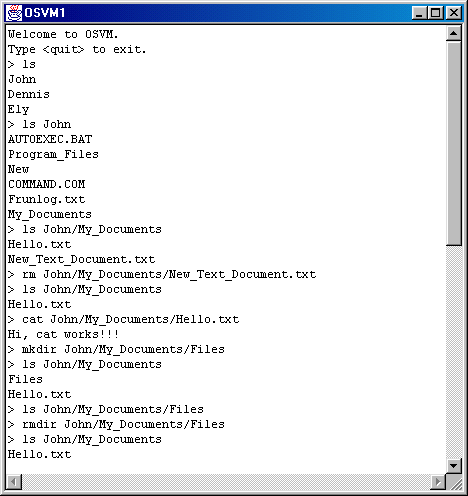
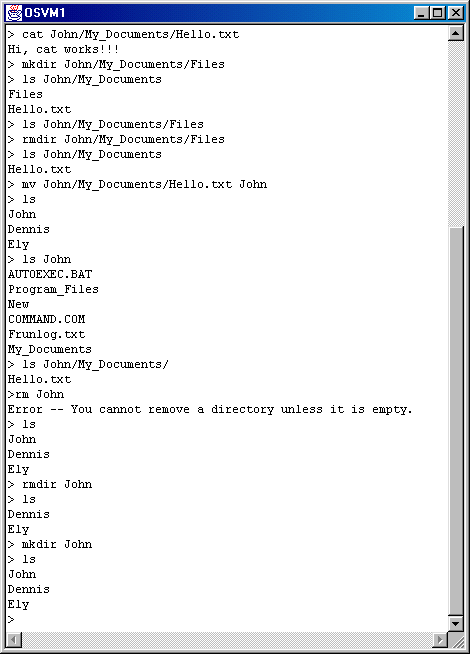
Part of the command interpreter is working at this time and that is why the output looks the way it does below. The command interpreter creates the file class loader, loads the classes through the class, and then pipes it to the console. The remainder of the command interpreter is not finished but it is not required for another three weeks.
The following shows all of the commands being executed. mv is ommitted because it is not working properly.
ConsoleWindow.java
KeyboardBuffer.java
Parser.java
WorkerThread.java
shell.java
login.java
user.java
ls.java
mv.java
mkdir.java
rmdir.java
cat.java
Contents | PAR #1 | PAR #2 | PAR #3 | PAR #4 | PAR #5 | PAR #6